
Why format matters
Much of a professional AI workflow involves placing data into the prompt: a document register, a set of transcript excerpts, a party list, a chronology. The model has to keep track of which value belongs to which item, which text is a source and which is an instruction, and where one document ends and the next begins. Formats the model has seen often in training, such as Markdown and JSON, make that bookkeeping easier. [source]
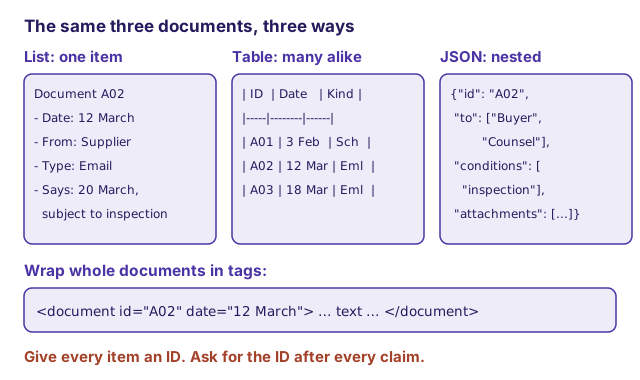
A delimiter marks a boundary in a prompt. It helps distinguish the task from source material, but is not an access control.
One item: a simple list
For a single record, field names and values in a plain list work well:
Document A02
- Date: 12 March
- From: Supplier (Morgan)
- To: Buyer
- Type: Email
- Summary: Proposes delivery on 20 March, subject to inspection
Lists also work for several records, but as the number grows, a model tracks values more reliably in a table. [source]
Many items of the same kind: a Markdown table
When you have many records with the same fields, a Markdown table is compact and models handle it well:
| ID  | Date     | From     | Type  | Key content                                   |
|-----|----------|----------|-------|-----------------------------------------------|
| A01 | 3 Feb    | Both     | Contract schedule | Delivery due 1 March                |
| A02 | 12 March | Supplier | Email | Proposes 20 March, subject to inspection      |
| A03 | 18 March | Buyer    | Email | Asks when inspection will occur               |
Tables also let the model combine facts. If the prompt says elsewhere that "today is 18 March" and you ask "what did the buyer send today?", a capable model will convert "today" to 18 March and find A03 in the table. [source] That inference is useful, but it is still an inference: if it matters, ask the model to state which row it used.
Uneven or nested details: JSON
Tables strain when items have many optional fields, or when each item carries its own list of attachments, recipients, or issues. JSON keeps every value next to its key, which helps the model keep the mapping straight: [source]
{
  "id": "A02",
  "date": "12 March",
  "from": "Morgan (Supplier)",
  "to": ["Buyer", "Buyer's counsel"],
  "attachments": [
    {"id": "A02-1", "title": "Revised schedule", "pages": 2}
  ],
  "conditions": ["subject to inspection"]
}
If deeply nested JSON uses too many tokens, an alternative is several small linked tables, the way a database stores related records (a normalized design, such as third normal form): a documents table, a people table, and an attachments table, joined by IDs. Models handle a few such links well, but accuracy falls as you ask them to chain more lookups together. [source] When a question depends on a long chain of joins, do the joining in a spreadsheet or script first and give the model the result.
Whole documents: fence or tag them
When you include free text such as a letter, a transcript excerpt, or a judgment, mark clearly where it starts and ends so the model does not mistake the document's words for your instructions. Triple backticks work. [source] Current vendor guidance also recommends descriptive XML-style tags, which let you attach metadata to each document: [source] [source]
<document id="A02" date="12 March" source="Supplier email">
Further to our call, we propose delivery on 20 March, subject to
inspection of the units at our facility.
</document>

<document id="A03" date="18 March" source="Buyer email">
Please confirm when the inspection will take place.
</document>
The tags are a convention, not a security boundary. A document can still contain sentences that look like instructions. The lesson Recognize prompt injection explains why that matters.
Give everything an ID, then ask for citations
If you want the model to cite where it got something, every citable item needs a unique, stable ID. [source] The simplest approach is to ask:
Answer only from the documents above. After every factual statement,
cite the document ID in square brackets, for example [A02]. If no
document supports a statement, do not make it; say what is missing.
IDs that match your own record (production numbers, tab numbers, transcript page and line) make checking fast. A citation to an ID the model invented, or to a passage that does not say what the model claims, is exactly the error you are looking for. The lesson Verify a work product covers the check.
Long material: documents first, question last
For prompts with long documents (Anthropic's guidance uses 20,000 tokens as the threshold), place the documents near the top and your instructions and question at the end. Anthropic reports that putting the query at the end improved response quality by up to 30 percent in its tests, especially with several documents. [source] For long-document tasks, the same guidance suggests asking the model first to pull out quotations relevant to the question, and then answer from those quotations. [source] That has a second benefit for lawyers: the quotations are what you check.
A reusable layout
<documents>
  <document id="A01" ...> ... </document>
  <document id="A02" ...> ... </document>
</documents>

<register>
| ID | Date | From | Type | Key content |
...
</register>

<task>
Using only the documents above, list every statement about the delivery
date. For each: quote the words, cite the ID, and say whether the date
is stated as agreed, proposed, or conditional.
If documents conflict, set out both. If the record is silent, say so.
</task>