
A prompt is the program
A prompt, sometimes called the context, is the text given to a model before it generates output. It steers the model toward the part of what it has learned that is relevant to your goal. A useful analogy: if the model is an interpreter, the prompt is the source code it runs. [source]
A model will even "run" a program in its head if you paste one in and ask what it prints: it predicts what the output of that code usually looks like, and is often close but not exactly right. [source] That near-miss is a good picture of everything a model does.
Prompts are often instructions ("List every date in A02") or questions ("When was the notice delivered?"). They can also be a partial document for the model to continue, a set of examples to imitate, or a mixture of all of these.
An empty prompt has no anchor
If you give a model no prompt at all, it has nothing to continue from, so it samples from anything it has ever learned: a recipe, a forum post, a fragment of code. Raw output from a model with no anchor reads like a random page from the internet. [source] In a chat application, hidden instructions and conversation state can supply an anchor even when the user message is empty.
The part you never see
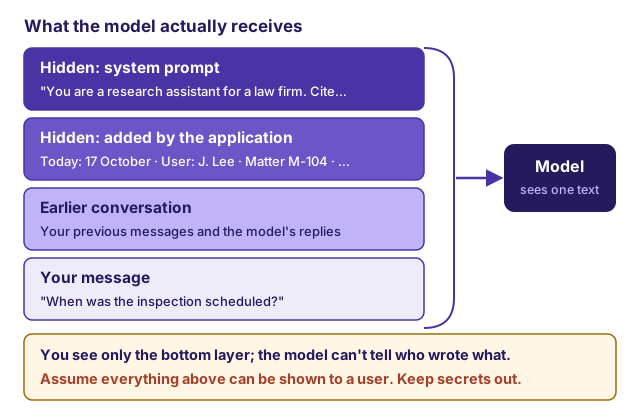
In a chat product, there is almost always a hidden portion of the prompt, usually at the start of every conversation. It typically sets the assistant's role, tone, and limits, and adds session details such as your name, your organization, the current date, and your time zone. [source] Developers using a model through an API usually put this in a field called the system prompt or system instruction.
The model itself is frozen at the point its training ended (its knowledge cutoff). If it seems to know today's date, the weather, or the contents of your matter folder, that is because the application put that information in the prompt. If the application did not, the model does not know it, and may guess.
Hidden prompts can be long. Production system prompts often run to many pages, repeat important rules, and include worked examples of good and bad responses. [source]
Assume every part of a prompt can be seen
A model will often repeat or paraphrase its hidden instructions if asked, even when told not to (Recognize prompt injection, jailbreaks, and leaks shows how). The OWASP Top 10 for LLM applications states that a system prompt should not be treated as a secret or used as a security control. [source]
For a firm building an internal tool, that means:
- never put credentials, API keys, or passwords in a prompt;
- never put another client's information in a prompt to "give context";
- do not rely on "do not reveal X" to protect X. If a user must not see it, do not give it to the model.
Why prompt engineering exists
Prompt engineering is the practice of writing prompts that get a model to do what you want, much as software engineering is the practice of writing code that gets a computer to do what you want. [source]
There is an old saying that computers only do what you tell them. Language models invert it. Writing a prompt steers a probabilistic system; omissions can produce unintended assumptions, but the model also follows its training and the application’s higher-priority instructions. [source] If you ask for a summary and do not say "only from the attached documents", drawing on general knowledge is a perfectly plausible continuation. If you do not say what to do when the record is silent, filling the gap is a plausible continuation too.
Good prompts therefore do four jobs:
- Supply the material the model cannot know: the documents, the date, the jurisdiction (Package source material and Give the model the facts, or give it tools).
- Constrain the task: what to produce, from which sources, in what form (Give AI a brief it can actually follow).
- Close the gaps: what to do when sources conflict, are silent, or are unreadable.
- Fit the limits: stay within the context window with room for the answer (What uploading a document establishes).
Different models respond differently to the same prompt. Vendors publish prompting guides for their current models; read the one for the model you use. [source] For broader study, the OpenAI Cookbook collects worked examples, and the DAIR.AI Prompt Engineering Guide surveys techniques with links to the research. [source] [source]